TABLE OF CONTENTS
Trending Minecraft Skins 2026: Find & Use Them
Skin culture in Minecraft moves fast — what's viral on Planet Minecraft today gets replaced by something sharper next week. This guide covers the trending Minecraft skins dominating 2026, where to find them, and exactly how to apply them across Java and Bedrock editions. You'll also learn how to customize trending designs to make them uniquely yours.
What's Actually Trending in Minecraft Skins Right Now
The aesthetics defining Minecraft skin culture in 2026.
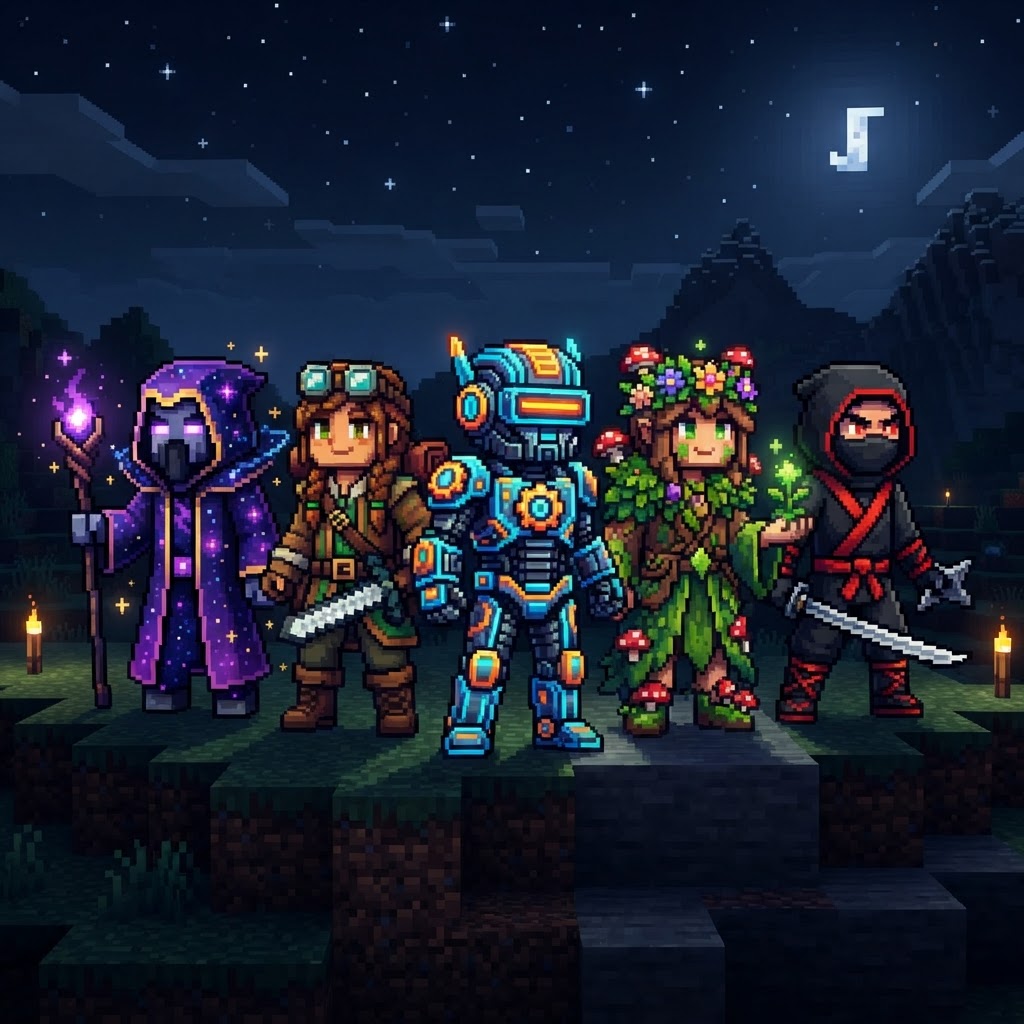
Skin trends in 2026 are pulling hard from three directions: dark fantasy, Y2K revival, and anime crossover aesthetics. The "clean silhouette" meta is also massive — skins with bold outlines, minimal face clutter, and strong color contrast perform best as small thumbnails on server lobbies and marketplace listings.
Here are the dominant style categories in 2026:
- Dark Cottagecore — hooded cloaks, muted earth tones, botanical details stitched into sleeves
- Cyber Samurai — neon-accented armor with clean geometric plating, popularized by creators like TechnoBladeLegacy fan projects
- Retro Y2K Fits — low-rise pixel jeans, butterfly clips, chunky sneakers rendered in 64×64 resolution
- Mob Humanoids — Enderman, Warden, and Allay hybrid-human designs that stay recognizable without being costumes
- Studio Ghibli Inspired — soft watercolor-style shading mimicking Howl's Moving Castle and Spirited Away palettes
- Download your chosen skin as a .PNG file (should be 64×64 or 64×32 pixels)
- Open the Minecraft Launcher and click your profile name in the bottom-left corner
- Select "Skins" from the left sidebar
- Click "New Skin", then "Browse" to locate your downloaded PNG
- Choose your model type — Classic (wide arms) or Slim (Alex-style narrow arms)
- Name the skin and click "Save & Use"
- Launch the game — your skin applies immediately in multiplayer and singleplayer
- Download the skin PNG or .MCPACK file to your device
- For PNG files: Open Minecraft → Settings → Profile → Edit Character → Owned Skins → Import
- For .MCPACK files: Double-click or tap the file — Minecraft opens automatically and imports it
- Navigate to your wardrobe and equip the imported skin
- On console (Xbox, PlayStation, Switch): Transfer via the Minecraft Marketplace or a linked Microsoft account — direct file imports are restricted on console platforms
- Download the base skin you want to modify (PNG format)
- Open it in MCSkin3D (free, Windows) or Blockbench (free, browser or desktop) — both show the 3D model in real time
- Change the face details first — eyes, eyebrows, and mouth are the fastest way to create a unique identity
- Swap 2-3 accent colors in the outfit using the color picker — shift a red scarf to teal, change boot color, alter hair highlights
- Add a personal detail — a small tattoo pixel on the neck, a logo on the chest, custom earrings rendered on the ear pixels
- Export as PNG and apply using the steps above
- Blockbench (blockbench.net) — industry standard, browser and desktop, free
- MCSkin3D — older but excellent for quick color edits on Windows
- Skinseed (iOS/Android) — best mobile option for on-the-go tweaks
- GIMP or Photoshop — for pixel-level control if you know what you're doing
Where to Find Trending Minecraft Skins in 2026
The platforms that consistently surface high-quality, current designs.
Not all skin repositories are equal. Some host thousands of low-effort recolors; others are curated communities where skilled artists post legitimate work. These are the platforms worth your time:
| Platform | Best For | Cost | Java/Bedrock |
| Planet Minecraft | Community uploads, trending filters | Free | Both |
| NameMC | Player skin discovery, UUID browsing | Free | Java only |
| Skindex (The Skindex) | Beginner-friendly browsing, volume | Free | Both |
| Minecraft Marketplace | Official HD Bedrock packs | $1–$5 USD | Bedrock only |
| CurseForge Skins Section | Creator-tagged packs, mod integration | Free/Paid | Both |
For anime and pop culture crossovers, Reddit communities like r/Minecraft and r/MinecraftSkins frequently host creator showcases with direct download links. Discord servers tied to specific content creators (Dream SMP fan communities, Hermitcraft unofficial servers) also share exclusive skin drops that never hit public platforms.
How to Apply Trending Minecraft Skins (Java & Bedrock)
Step-by-step installation for both major editions — no launcher confusion.
Java Edition (Minecraft Launcher 3.x+)
Bedrock Edition (Windows, Console, Mobile)
Customizing Trending Minecraft Skins to Stand Out
Why using a skin as-is leaves identity on the table.
Downloading a trending skin and using it unmodified means you're sharing a look with potentially thousands of other players. The better move is light customization — enough to make it yours without rebuilding from scratch.
The fastest customization workflow in 2026:
Tools worth knowing:
Best Resources for Staying on Top of Trending Minecraft Skins
How to keep your skin current without chasing every micro-trend.
The skin meta shifts with game updates, content creator influence, and broader internet culture. Staying relevant means knowing where signals come from before they hit mainstream skin sites.
| Skinseed App | Mobile creation and discovery | Free (IAP) | Both |
| Signal Source | What to Watch | Update Frequency |
| Planet Minecraft Hot | Weekly trending filter | Weekly |
| r/MinecraftSkins | Creator showcases, feedback posts | Daily |
| TikTok #MinecraftSkin | Viral creator outfits, tutorial trends | Daily |
| Minecraft Live / Mob Votes | New mob aesthetics spike post-event | Event-based |
| Major YouTuber uploads | Dream, Technoblade tributes, Hermitcraft | Per upload |
| Minecraft snapshot releases | New block textures inspire skin palettes | Bi-weekly |
Minecraft's 2026 roadmap includes the Pale Garden biome expansion (confirmed in 1.21.4) and ongoing Bundles of Bravery challenge content. Both are already generating skin aesthetics — expect Pale Oak and creaking creature-inspired designs to trend heavily in Q2 2026.
Conclusion: Work the Skin Meta Smarter
Trending Minecraft skins in 2026 are more sophisticated than ever — the community has collectively leveled up its pixel art craft, and expectations have risen to match. The players who stand out aren't downloading whatever topped Planet Minecraft last Tuesday and calling it done. They're identifying the aesthetic direction early, making intentional customizations, and knowing which platforms surface genuine quality.
Your action steps: bookmark Planet Minecraft's weekly trending filter, grab Blockbench if you haven't already, and spend 20 minutes tweaking your next skin before uploading it to your account. The difference between "generic" and "memorable" in Minecraft is often three pixel changes and one unique color choice.
The skin you wear is your identity on every server you join. Make it count.
RELATED ARTICLES
Featured Minecraft Modpack: Create a World of Industry
If you're ready to transform Minecraft into a fully mechanized industrial playground, this Create modpack guide covers everything you need. You'll learn what makes Create-based modpacks stand out, whi...
Minecraft Survival Iron Farm: Build a Compact, High-Yield Design
Building a reliable Minecraft iron farm is one of the highest-value infrastructure projects in any survival world. This guide covers the mechanics behind iron golem spawning, walks you through a compa...
How to Make a Barrel in Minecraft: Recipe & Uses
Running out of chest space is one of the most frustrating mid-game problems in Minecraft, and barrels are one of the best solutions most players overlook. Unlike chests, barrels work even when complet...
STAY UPDATED
New blog posts, guides, and community tips delivered to your inbox.
No spam. Unsubscribe anytime.
Comments (0)
No comments yet. Be the first to share your thoughts!

