TABLE OF CONTENTS
How to Make a Beacon in Minecraft: Materials, Crafting & Setup
You've just defeated a Wither, your inventory is full of hard-earned materials, and now you want the reward that actually matters — permanent speed, strength, or regeneration buffs that make the rest of your playthrough feel unstoppable. The Minecraft beacon is the endgame power-up most players chase but many set up wrong, wasting hours of grinding. This guide cuts through the confusion and gets you from raw materials to fully-powered beacon pyramid as efficiently as possible.
What a Beacon Actually Does (And Why You Want One)
Understanding the payoff before you grind for it.
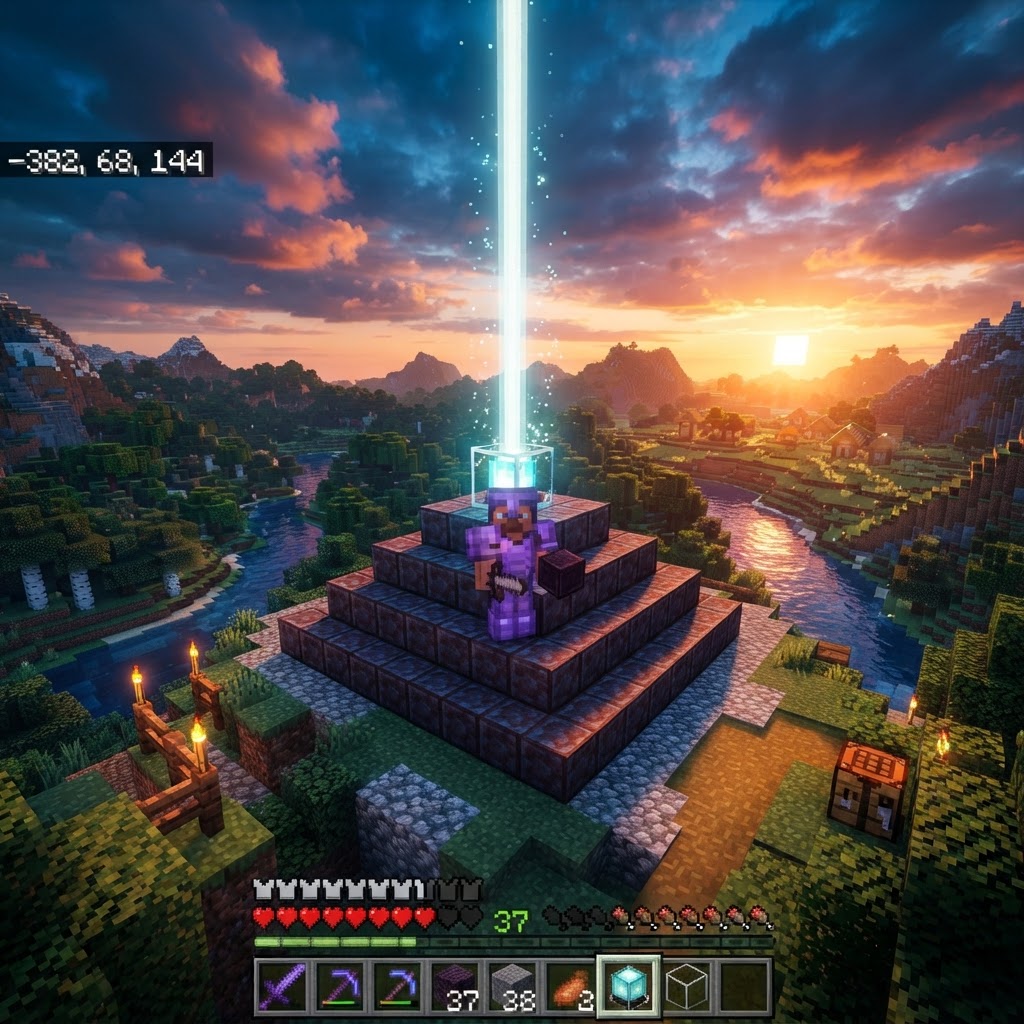
Most guides jump straight to crafting without explaining the real value proposition. A beacon isn't just a pretty light beam — it's a persistent area-effect buff generator that works as long as you stay within range. Once active, it continuously grants you and nearby players status effects like Haste, Speed, Strength, Resistance, Jump Boost, or Regeneration without you consuming a single potion.
The range and number of effects depend on how many layers your pyramid has, which we'll cover in detail. The short version: a full four-layer pyramid gives you two simultaneous effects — one primary and one secondary — covering a 50-block radius. For any serious base, that translates to faster mining, better combat, and passive health regeneration around the clock.
| Pyramid Layers | Blocks Required | Effect Range | Available Effects |
|---|---|---|---|
| 1 | 9 | 20 blocks | Speed or Haste |
| 2 | 34 | 30 blocks | + Resistance or Jump Boost |
| 3 | 83 | 40 blocks | + Strength |
| 4 | 164 | 50 blocks | + Regeneration (secondary) |
Every Material You Need Before You Craft
Don't start the pyramid until you have everything — backtracking kills momentum.
There are two separate resource challenges here: crafting the beacon block itself, and building the pyramid base. Players often focus on one and forget the other.
To craft one beacon block you need:
- 5 Glass blocks (sand smelted in a furnace — easy)
- 3 Obsidian blocks (mined with a diamond or netherite pickaxe)
- 1 Nether Star (dropped only by the Wither boss)
The Nether Star is the real bottleneck. You cannot find it in loot chests or trade for it. You must summon and kill the Wither, which means you need:
- 4 Soul Sand or Soul Soil blocks
- 3 Wither Skeleton Skulls (the notorious grind — these have roughly a 2.5% drop rate)
For the pyramid base, you'll need one of these mineral blocks:
| Material | Source | Difficulty to Obtain | Notes |
|---|---|---|---|
| Iron Blocks | Smelt iron ore, 9 ingots per block | Medium | Most common choice |
| Gold Blocks | Mine/smelt gold, 9 ingots per block | Medium | No gameplay advantage |
| Diamond Blocks | Mine diamonds, 9 ingots per block | Hard | No advantage, flex pick |
| Netherite Blocks | Craft from netherite ingots | Very Hard | Pure flex |
| Emerald Blocks | Trading/mining, 9 ingots per block | Hard | No advantage |
Crafting the Beacon Block Step by Step
The crafting recipe is simple — the preparation isn't.
Once you have your Nether Star, glass, and obsidian, the actual crafting is straightforward:
- Open your crafting table (3x3 grid)
- Fill the entire top row with 3 glass blocks
- Place 1 obsidian in the left-middle slot, 1 Nether Star in the center-middle slot, and 1 obsidian in the right-middle slot
- Fill the entire bottom row with 3 obsidian blocks — wait, correction below
- Row 1: Glass | Glass | Glass
- Row 2: Glass | Nether Star | Glass
- Row 3: Obsidian | Obsidian | Obsidian
- Layer 1 (top, directly under beacon): 3×3 = 9 blocks
- Layer 2: 5×5 = 25 blocks
- Layer 3: 7×7 = 49 blocks
- Layer 4 (base): 9×9 = 81 blocks
- The beacon must sit on the very top center of the pyramid
- Nothing can block the beam between the beacon and the sky — no leaves, glass, or even water directly above it
- The pyramid must be a complete, unbroken structure — gaps or missing blocks break the activation
- Iron Ingot
- Gold Ingot
- Diamond
- Emerald
- Netherite Ingot
The correct layout visualized:
Drag the beacon block into your inventory. That's the easy part done.
Building the Pyramid Correctly
The structure under your beacon determines everything — get this wrong and nothing works.
Place your beacon block on top of a solid pyramid made from any of the valid mineral blocks listed above. The pyramid must follow a specific staircase shape — each layer wider than the one above it by one block on each side.
Layer dimensions (blocks per layer):
For a full four-layer pyramid you need 164 mineral blocks total. At 9 ingots per block, that's 1,476 iron ingots if you go full iron — a significant but achievable grind with an iron farm or dedicated mining session.
Placement rules that trip people up:
Activating Your Beacon and Choosing Powers
The beacon won't do anything until you feed it — here's how to pick the right effects.
Right-click your completed beacon to open its interface. You'll see a menu with effect slots and a payment window. To activate any effect, you must insert one of the following as payment:
All payment items are equivalent — one activates the beacon. Netherite ingots aren't "better," they just feel expensive. Use iron.
How to choose effects based on pyramid level:
With a 1-layer pyramid, you unlock Speed I or Haste I. For most players building their first beacon, Haste I is the immediate winner — faster mining transforms your early base-building speed dramatically.
With a 2-layer pyramid, you add Resistance I or Jump Boost I to the available pool. Resistance is underrated for players who fight frequently near their base.
With a 3-layer pyramid, Strength I becomes available. This is the combat player's pick — permanent Strength I is roughly equivalent to always having a potion active.
With a 4-layer pyramid, you unlock a secondary effect slot and can upgrade your primary effect to level II. The secondary slot is locked to Regeneration I only. The upgrade option boosts your chosen primary effect — Haste II is particularly powerful, effectively giving you permanent Haste II across 50 blocks.
Common Mistakes Players Make With Beacons
These errors waste materials, time, or the beacon's full potential.
Mistake 1: Killing the Wither underground without preparation.
The Wither explosion on spawn is massive. Many players lose their Nether Star to the explosion or die before looting it. Always fight the Wither in a controlled arena — ideally a long narrow tunnel in the End or bedrock level where it can't fly erratically.
Mistake 2: Building a 1-layer pyramid and calling it done.
A single-layer beacon with Speed I is fine, but you've already done the hardest work (killing the Wither). Investing in layers 2-4 costs only metal blocks — far easier to farm than another Nether Star. Don't leave power on the table.
Mistake 3: Placing the beacon indoors without checking the roof.
Any solid block above the beacon breaks the beam and deactivates effects. If you're building a beacon inside a structure, the roof directly above must be open to sky or use transparent blocks like glass — though even glass in some versions can interfere. Test it visually: the beam should shoot up into the sky.
Mistake 4: Forgetting the effect range is centered on the beacon, not you.
Players sometimes place beacons at the edge of their base and wonder why effects drop off in certain rooms. Center the beacon in the area where you'll actually spend the most time — typically near your crafting/storage area or main farm.
Mistake 5: Using diamonds or netherite as payment.
One iron ingot activates the beacon identically to one netherite ingot. Never pay with premium materials unless iron is somehow completely unavailable.
Pro Strategies for Advanced Players
Single beacons are a starting point — here's how experienced players build beacon networks.
Run multiple beacons with different effects. Nothing stops you from building several separate pyramids. Experienced players often run a Haste II beacon in their mining area, a Strength II beacon near a mob farm or PvP zone, and a Regeneration beacon in their main base. Each requires its own full pyramid but the payoff in specialized areas is enormous.
Overlap beacon ranges deliberately. If two beacons are within 50 blocks of each other (on a 4-layer pyramid), you can receive both effects simultaneously in the overlap zone. Plan your base layout around a central area where multiple beacon ranges intersect — effectively giving you 3-4 active effects without needing a single beacon to provide them all.
Use the Wither fight to farm extra skulls. Before your killing blow, make sure you've looted any skulls that dropped during the fight. Some players build dedicated Wither skeleton farms in the Nether — a well-designed farm can produce skulls fast enough to build a multi-beacon setup within a single play session.
Pyramid material arbitrage. If you have an active iron farm, iron blocks are effectively free over time. Build your pyramid with iron first to get the beacon running, then replace blocks with more visually appealing materials once you have surplus. The beacon stays active during swaps as long as you don't break the structural integrity all at once.
Key Takeaways
The Minecraft beacon rewards patience and planning at every stage. The Nether Star grind is the real gate — once you have it, the pyramid is a resource investment that pays permanent dividends. Build at minimum a three-layer pyramid immediately rather than stopping at one, place it centrally in your most-used area, and always pay with iron. For players serious about their world, multiple specialized beacons running simultaneously transforms gameplay in ways that no other single feature matches. The effort is front-loaded and substantial, but the result is an endgame quality-of-life upgrade that makes everything else easier forever.
RELATED ARTICLES

How to Make a Book in Minecraft: Easy Recipe & Uses
You're probably here because you just hit a wall — enchanting, writing, or crafting something advanced — and realized you need books but aren't sure how to get them efficiently. Books are one of Minec...
How to Make a Blast Furnace in Minecraft: Recipe & Uses
If you've been manually smelting ores one by one in a regular furnace, you're wasting serious time — the Minecraft blast furnace doubles your smelting speed for metals and ores, making it one of the m...
How to Make a Smoker in Minecraft: Recipe & Uses
If you're tired of waiting forever for your food to cook in a standard furnace, the smoker is the upgrade you didn't know you needed. It cooks food items at exactly twice the speed of a regular furnac...
STAY UPDATED
New blog posts, guides, and community tips delivered to your inbox.
No spam. Unsubscribe anytime.
Comments (0)
No comments yet. Be the first to share your thoughts!

