TABLE OF CONTENTS
Loom in Minecraft: How to Make & Use a Loom (Fast Guide)
Banners are one of Minecraft's most underused decorative tools, and the loom is the machine that unlocks their full potential. If you've been manually crafting banner patterns at a crafting table — or worse, skipping banners entirely because the system felt confusing — this guide will fix both problems fast. Here's everything you need to know to craft, place, and master the loom in Minecraft.
What Is a Loom and Why Do You Actually Need One
Understanding the loom's purpose saves you hours of frustration with the banner system.
The loom is a utility block introduced in Java Edition 1.14 and Bedrock Edition 1.11. Its entire function centers on one thing: applying patterns to banners more efficiently than the crafting table method. Before the loom existed, players had to memorize specific crafting recipes for every single banner pattern — a genuinely miserable experience involving dyes, wool, and rare items like creeper heads or oxeye daisies arranged in precise grid positions.
The loom removes all of that. It gives you a visual interface, shows you exactly what the finished banner will look like before you commit, and lets you stack multiple layers of patterns with full color control. It also serves as the job site block for the Fletcher villager profession, which means a loom placed near an unemployed villager will convert them into a Fletcher — useful if you're building a trading hall.
What the loom enables:
- Applying up to 6 pattern layers on a single banner
- Previewing designs in real time before applying them
- Using special patterns (Skull Charge, Flower Charge, etc.) without needing the rare items in Java Edition — only the loom and a dye
- Converting unemployed villagers into Fletchers
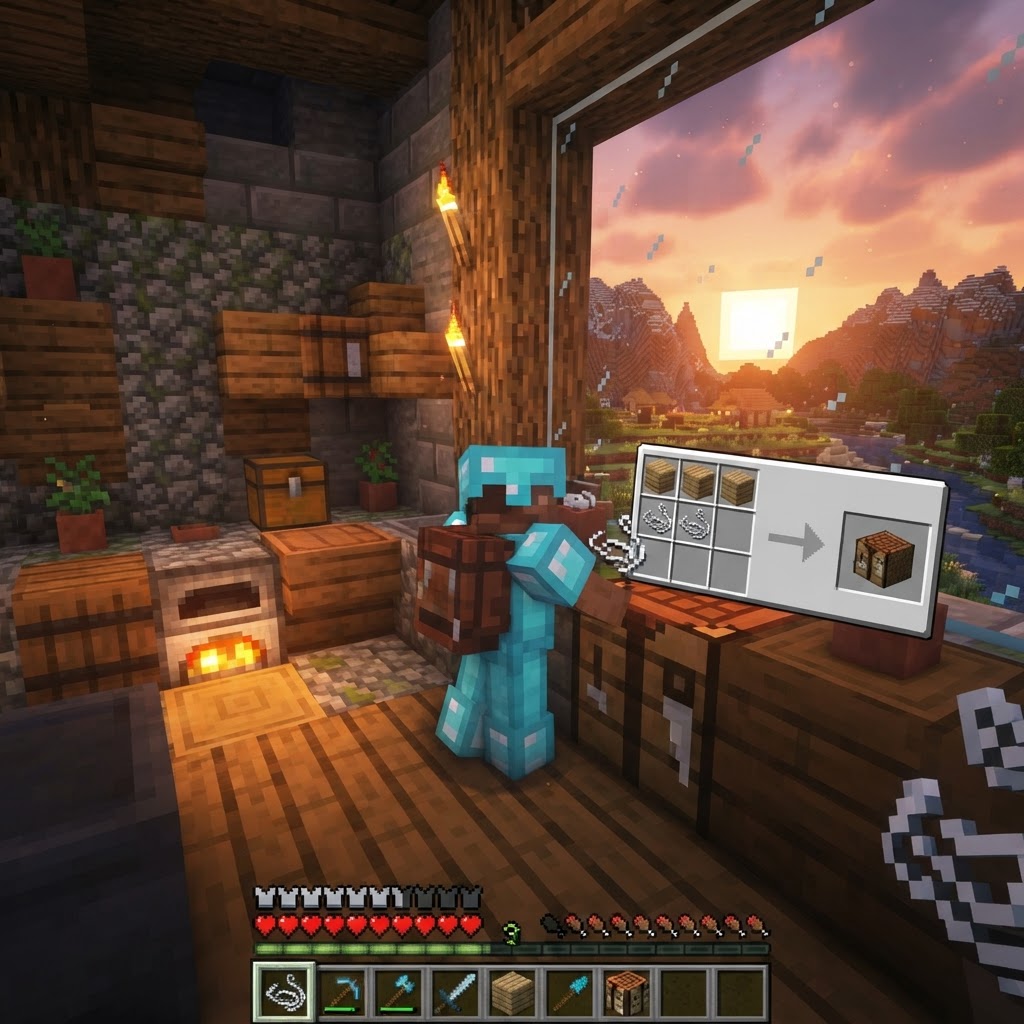
- 2 Wood Planks (any type — oak, spruce, birch, jungle, acacia, dark oak, mangrove, cherry, bamboo, or crimson/warped)
- 2 String (dropped by spiders or found in dungeons, temples, and mineshafts as cobweb loot)
- Open your 3x3 crafting table
- Place 1 String in the top-left slot
- Place 1 String in the top-center slot (or top-right — pattern is flexible as long as strings are in the top row and planks fill the second row beneath them)
- Place 1 Wood Plank in the middle-left slot
- Place 1 Wood Plank in the middle-center slot
- Drag the loom from the output slot into your inventory
- Top-left slot: Banner (plain or already-patterned)
- Top-middle slot: Dye (any of the 16 dye colors)
- Top-right slot: Banner Pattern item (optional — only required for special patterns on Java; required for special patterns on Bedrock)
- Place a plain white (or any color) banner in the banner slot
- Place the dye color you want in the dye slot
- Browse the pattern grid — you'll see available patterns populate based on your inputs
- Click the pattern you want to apply
- The preview window on the right shows your banner with the selected pattern applied
- Click the output banner to collect it
- Place the output banner back into the banner input slot to add another pattern layer
- Repeat up to 6 total pattern layers
- Craft the loom with 2 planks + 2 string at any crafting table
- Start with a white banner base for the most accurate color output
- Plan all 6 pattern layers before applying — there's no undo
- Clone finished banners in the crafting grid to avoid rebuild work
- On Java Edition, most special patterns need only a dye in the loom — no rare items required
Crafting the Loom: Exact Recipe and Materials
Two planks and two strings — this is one of Minecraft's simplest crafting recipes.
The loom recipe is intentionally accessible. You don't need rare materials, furnace-processed items, or anything you'd find only in the late game. Here's exactly what you need:
Materials Required:
Crafting Grid Placement:
The actual required pattern is: two strings side-by-side in any two adjacent slots of the top row, with two matching planks directly below them. The crafting grid is forgiving here.
| Material | Where to Get It | Quantity Needed |
|---|---|---|
| Wood Planks | Crafted from any log (4 planks per log) | 2 |
| String | Spider drops, cobwebs (with sword), chest loot | 2 |
| Crafting Table | Crafted from 4 planks | 1 (to craft loom) |
You can also find looms naturally generated in villages — specifically in shepherd houses inside plains and taiga biomes. If you're near a village, you might skip crafting entirely and just break the existing loom (it drops itself without needing a specific tool).
How to Use a Loom: Step-by-Step Interface Guide
The loom's interface is visual and intuitive once you understand its three input slots.
Place the loom on the ground and right-click (or use your platform's interact button) to open it. The interface has three input slots on the left and a large pattern selection grid in the middle.
The three input slots:
Step-by-step process:
Banner Pattern Reference: What You Can Make
Knowing which patterns exist — and what they require — prevents wasted materials.
The loom gives you access to dozens of patterns split into two categories: basic patterns (dye only) and special patterns (require a Banner Pattern item).
Basic Patterns (Dye Only — No Special Item):
| Pattern Name | Visual Effect |
|---|---|
| Base | Solid color fill |
| Stripe patterns (vertical, horizontal, diagonal) | Lines across banner |
| Gradient (top/bottom) | Color fade effect |
| Border | Outline around the edge |
| Brickwork | Repeating brick texture |
| Creeper Charge | Creeper face (Java: dye only; Bedrock: needs item*) |
|---|---|
| Skull Charge | Skull face (Java: dye only; Bedrock: needs item*) |
| Flower Charge | Flower motif (Java: dye only; Bedrock: needs item*) |
| Thing (Mojang logo) | Hidden pattern (Requires Banner Pattern item on both versions*) |
Special Banner Pattern Items and Their Sources:
| Pattern Item | How to Obtain | Pattern Applied |
|---|---|---|
| Flower Charge | Oxeye Daisy + Paper | Flower/Mojang symbol |
| Creeper Charge | Creeper Head + Paper | Creeper face |
| Skull Charge | Wither Skeleton Skull + Paper | Skull |
| Thing | Enchanted Golden Apple + Paper | Mojang logo |
| Snout | Found in Bastion Remnant chests | Piglin face |
| Globe | Found in Cartographer trades | Globe |
|---|---|---|
| Flow | Found in Trial Chamber vaults | Flow design |
| Guster | Found in Trial Chamber vaults | Guster design |
Common Mistakes Players Make With the Loom
These are the errors that waste your materials and time — avoid all of them.
1. Applying patterns in the wrong order
Banner patterns stack visually, and order matters. A red stripe applied over a white base looks completely different than a white stripe applied over a red base. Sketch your design mentally (or on paper) before you start stacking layers.
2. Using the wrong base banner color
The base banner color bleeds through semi-transparent patterns. A dark gray base will mute lighter dye colors applied over it. If you want vivid, clean patterns, start with a white banner as your base — it gives you the most accurate color representation.
3. Hitting the 6-layer cap without finishing the design
Each banner only accepts 6 pattern layers total, including the base color if you dye the banner itself. Plan your layer count before you start. If you hit 6 and your design isn't complete, there's no undo.
4. Forgetting that banners can be cloned
Once you've perfected a banner design, you don't need to rebuild it from scratch for copies. Place your finished banner in a crafting table with a blank banner of the same base color — the pattern transfers completely. This saves enormous time for decorating large builds.
5. Ignoring the loom for Fletcher trading
Placing a loom near an unemployed villager gives you a Fletcher, who sells arrows, bows, and crossbows. Many players forget this entirely and miss out on a reliable arrow supply chain.
Pro Strategies for Advanced Banner Design
These techniques separate players who make flags from players who make art.
Layer bleeding for gradient effects
Apply a gradient-top pattern in one color, then layer a gradient-bottom pattern in a different color over it. The overlapping middle section creates a blended transition that looks far more complex than two separate patterns.
The "mask and reveal" technique
Apply a full solid color as a layer, then apply a cut pattern over it in your original base color. The result looks like the underlying color has shapes cut out of it. Used correctly, this creates the illusion of negative space and depth.
Replicating real-world flags
Most national and organizational flags can be approximated with 4-6 pattern layers. The Minecraft community has documented hundreds of flag recreations. Research the color layout of any flag, identify which loom patterns match each shape, and build the layers from background to foreground.
Combine banners with shields
In Java Edition, you can apply a banner pattern to a shield by combining a shield with a banner in the crafting grid (no loom required for this step, but you need the banner designed first). This creates a personalized shield that shows your banner design — perfect for faction servers or roleplay.
Automated banner dispensing
In technical builds, dispensers can place banners on signs automatically when combined with redstone. Design a single master banner, clone it in bulk using the crafting table method, and feed the stack to dispensers for large-scale automated decoration.
Conclusion: The Loom Is Worth Learning Properly
The loom in Minecraft is one of those systems that rewards the players who take fifteen minutes to understand it and largely ignores everyone else. The crafting recipe is trivial — two planks, two string — so there's genuinely no reason to delay building one.
The real value is in using it intentionally: starting with the right base color, planning your layer order before you commit, understanding the difference between Java and Bedrock pattern availability, and cloning finished banners instead of rebuilding them. Get those fundamentals right and the loom becomes a legitimate creative tool, not just a curiosity.
Key takeaways:
RELATED ARTICLES

How to Make a Book in Minecraft: Easy Recipe & Uses
You're probably here because you just hit a wall — enchanting, writing, or crafting something advanced — and realized you need books but aren't sure how to get them efficiently. Books are one of Minec...
How to Make a Blast Furnace in Minecraft: Recipe & Uses
If you've been manually smelting ores one by one in a regular furnace, you're wasting serious time — the Minecraft blast furnace doubles your smelting speed for metals and ores, making it one of the m...
How to Make a Smoker in Minecraft: Recipe & Uses
If you're tired of waiting forever for your food to cook in a standard furnace, the smoker is the upgrade you didn't know you needed. It cooks food items at exactly twice the speed of a regular furnac...
STAY UPDATED
New blog posts, guides, and community tips delivered to your inbox.
No spam. Unsubscribe anytime.
Comments (0)
No comments yet. Be the first to share your thoughts!

