TABLE OF CONTENTS
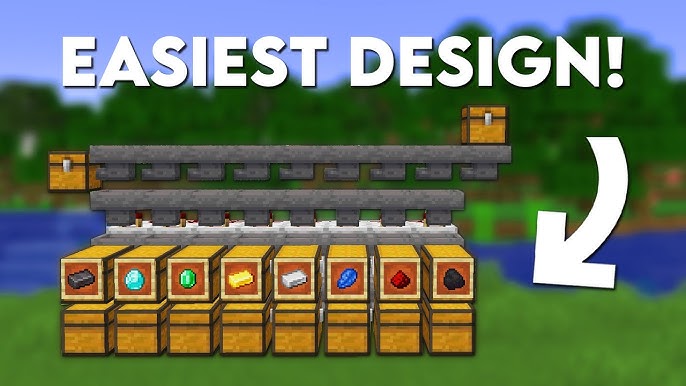
Ultimate Automatic Item Sorter for Survival (Compact Redstone)
If you've ever spent more time digging through a disorganized chest room than actually playing the game, you already know the pain. Cobblestone everywhere, diamonds buried under a mountain of dirt, and that one piece of iron ore you desperately need hiding somewhere in the chaos. Building an automatic item sorter is honestly one of the best quality-of-life upgrades you can make in any survival world, and once you have one running, you'll never want to go back. In this guide, we're diving deep into everything you need to know to build a compact, efficient, and reliable automatic item sorter that will keep your base organized while you focus on the adventures that actually matter.
Whether you're a redstone newbie or a seasoned circuit builder, this walkthrough has something for you. We'll cover the mechanics, the materials, step-by-step building instructions, optimization tips, and some creative variations to take your storage system to the next level. Let's get into it.
---
Why Every Survival Player Needs an Automatic Item Sorter
Let's be honest — the default approach to storage in Minecraft survival is absolute chaos. You start with one chest, then two, then suddenly you have a wall of thirty chests and absolutely no idea where anything is. It's a universal experience, and it's one of the reasons why learning to build an automatic item sorter is considered a rite of passage in the Minecraft community.
The beauty of an automatic item sorter is that it does exactly what the name suggests: items that enter the system are automatically routed to their designated chests without any manual effort from you. Dump your entire inventory into a single input chest when you come back from a mining trip, and within seconds, your cobblestone is in the cobblestone chest, your ores are sorted by type, and your rare finds are tucked away safely where they belong.
Beyond the sheer convenience, having an organized storage system actually makes you a better and faster player. You spend less time fumbling through chests, which means more time building, exploring, fighting bosses, or doing whatever you love most. For multiplayer servers, a shared automatic item sorter is practically a necessity — nothing kills the cooperative vibe faster than six players all digging through the same messy chest room looking for building materials.
The efficiency gains are real, tangible, and immediately noticeable the first time you use a properly built sorter. Trust me on this one.
---
▶ Watch on YouTube
Understanding the Core Mechanics Before You Build
Before we throw down a single hopper, it's worth taking a few minutes to understand why an automatic item sorter works the way it does. Having this foundation will help you troubleshoot problems, expand your system, and even design your own variations later.
How Hoppers and Comparators Work Together
The backbone of any automatic item sorter is the humble hopper. Hoppers pull items from containers or from the ground above them and push those items into containers below or in front of them. The key thing to understand is that a hopper that receives a redstone signal becomes locked — it stops moving items while that signal is active.
This is where item filters come in. The filtering mechanism typically involves a hopper connected to a small chest that contains one or more "filter items" — these are the specific items you want that particular channel to sort. A comparator reads the fullness of that filter chest. When a matching item passes through, the comparator signal changes in a way that allows the item to drop into the designated output chest. Items that don't match pass along to the next filter in the line.
The comparator outputs a signal strength based on how full a container is. When combined with a specific number of items in the filter chest, you can create a precise output signal that activates or deactivates adjacent hoppers. It sounds complicated at first, but once you see it in action, the logic clicks beautifully.
The Role of Overflow Protection
One of the most overlooked aspects of designing an automatic item sorter is overflow protection. What happens when a chest fills up completely? Without proper overflow handling, items can back up through your entire system, causing sorting errors, item loss, or a complete jam. A well-designed sorter either routes overflow items to a general "misc" chest at the end of the line or prevents new items from entering until space frees up. We'll address this in the building section so your system stays healthy long-term.
---
Materials You'll Need
One of the best things about building an automatic item sorter in survival mode is that the required materials are relatively accessible, even in the early-to-mid game. Here's what you'll need for a basic six-channel sorter:
- Hoppers — You'll need roughly 5–6 hoppers per sorting channel, plus a few extra for the input and overflow sections. For a six-channel sorter, plan for around 35–40 hoppers total.
- Chests — One double chest per sorted category, plus one for the input and one for overflow. That's about 16 chests minimum.
- Comparators — One per sorting channel, so six comparators for a six-channel setup.
- Repeaters — A handful for signal timing and extension.
- Redstone Dust — A few stacks should be more than enough.
- Building Blocks — Any solid block for the frame. Many players use stone, terracotta, or concrete for aesthetics.
- Solid Transparent Blocks — Glass or slabs can be useful for certain signal routing situations.
- Filter Items — At least one item of each type you want to sort, used inside the filter hoppers.
The total material cost is very manageable. The hoppers are the most resource-intensive component since each one requires five iron ingots and a chest. If you're in early survival, consider starting with a four-channel sorter and expanding as you gather more iron.
---
▶ Watch on YouTube
Step-by-Step Build Guide for a Compact Automatic Item Sorter
Now for the main event. This design is compact, scalable, and uses a classic item filter layout that's been refined by the community over years of gameplay. We'll build a single sorting channel first, and then you'll understand exactly how to replicate and expand it.
Building a Single Sorting Channel
Step 1: Lay the Output Chest
Start by placing a double chest where you want your sorted items to land. This is your output chest for one category — let's say cobblestone, just to keep it concrete (pun intended).
Step 2: Place the Filter Hopper
Place a hopper facing into the top of your output chest. To do this, hold shift and right-click on the side of the chest while holding a hopper. This is your filter hopper, and it's the brain of the operation.
Step 3: Fill the Filter Hopper
Open the filter hopper's inventory. Fill four of the five slots with 1 item each of the type you want to sort (in our example, cobblestone). Fill the fifth slot with 1 item of a different, easily stackable, and ideally stackable-to-64 item — dirt works great. That gives you a total of 4 filter items plus 1 "filler" item in specific slots.
The exact count matters here. You want a specific number of items in the filter hopper so that when the correct item enters, the comparator reads a specific signal strength. The standard configuration uses 41 items total: four slots with 1 filter item each (4 items) and one slot with 37 filler items, totaling 41. This produces a comparator output of 1 when the hopper is in its default state and 2 when a matching item is present.
Step 4: Place the Comparator
Place a comparator reading out of the side of the filter hopper. Make sure it's in "compare" mode (not subtraction mode — that's the default, so you're good). The comparator will output a signal when items in the hopper match your filter configuration.
Step 5: Connect the Redstone
Run redstone dust from the comparator output to a block adjacent to a second hopper — this is your "input line" hopper that sits above the filter hopper. When the comparator detects the matching item, it should activate and lock the input line hopper just long enough for the item to stay in the filter and drop into the chest below.
Wait — that's the opposite of what you want. Here's the nuance: the comparator actually signals to lock the neighboring hoppers except when the matching item is present. The wiring creates a situation where the filter hopper is normally locked (by a constant signal), and when a matching item arrives and temporarily changes the signal, the filter hopper briefly unlocks to pass the item into the chest.
In practice, the standard setup uses a torch or a constant power source to keep the filter hopper locked by default, and the comparator output overrides (cancels) that signal when a matching item is detected. Redstone torches on blocks adjacent to the powered input hopper are your friends here.
Step 6: Connect to the Main Input Line
The main input line is a series of hoppers running horizontally (or in a row) that feeds items from your input chest through each sorting channel one by one. Items travel down the hopper line until they find their matching filter. If no filter matches, they fall through to the overflow/misc chest at the end.
Chaining Multiple Channels Together
Once your first channel works correctly, chaining additional channels is straightforward. Simply extend the hopper input line past the first filter and replicate the filter hopper, comparator, and locking mechanism for each new category. Each channel sits side by side, and items that don't match the first filter continue down the line to the next.
Keep the following in mind when scaling up:
- Space your channels carefully. Comparators and redstone signals can interfere with each other if your channels are too close together. Leave at least one block of separation between channel outputs.
- Keep the input line level. All the hoppers in the main input line should be connected in sequence, each pointing into the next. A break in the chain means items might get stuck or fall out.
- Label everything. Item frames on output chests with the relevant item displayed are an absolute game-changer for navigation. Future-you will be very grateful.
- Test each channel individually. Before connecting everything, drop a few items into the input chest and watch where they go. Catching errors channel by channel is much easier than debugging the whole system at once.
---
Optimization Tips and Common Mistakes to Avoid
Building your first automatic item sorter is exciting, but there are a few common pitfalls that can turn a smooth build session into a frustrating troubleshooting marathon. Here's what to watch out for.
Mistake #1: Wrong Item Count in the Filter
The filter item count is precise. If you put in more or fewer items than intended, your comparator output will be off and the channel will either not sort correctly or will sort everything into that one chest. Double-check your filter configuration before connecting everything.
Mistake #2: Hoppers Not Connected Properly
A hopper that isn't actually feeding into the next hopper or chest is one of the sneakiest bugs. Always verify connections by sneaking and observing the hopper's direction indicator, or by dropping a test item and watching its path.
Mistake #3: Missing Overflow Protection
If you sort for common items like cobblestone, gravel, or sand, those chests will fill up faster than you expect. Add a double chest at the end of your input line hopper chain to catch unsorted or overflow items. Some players also add a separate overflow line that kicks in when a sorted chest reaches capacity.
Mistake #4: Forgetting About Unstackable Items
The standard item filter design works best with stackable items. Unstackable items (like tools, armor, or bows) require modified filter designs because they can't be counted the same way. For these, consider a separate dedicated dropper or shulker box storage system rather than trying to route them through a standard hopper filter.
Pro Tip: Use Item Names for Easy Identification
Rename your filter items using an anvil before placing them in the hopper. This doesn't affect sorting functionality, but it helps when you open the filter hopper during maintenance to remember exactly what each slot is doing.
Pro Tip: Hopper Minecarts for Lag Reduction
In large-scale systems with many hoppers, lag can become an issue — especially on multiplayer servers. Hopper minecarts (which move along rails and pick up items) can sometimes be used in place of stationary hoppers for the main input line to reduce the total entity/tile entity count and keep your server running smoothly.
---
Creative Variations and Expansions
The standard automatic item sorter design is fantastic on its own, but the real magic happens when you start customizing and expanding it to fit your playstyle.
Multi-Floor Storage Systems
Many players run their sorter vertically across multiple floors of a base. The input line runs on the top floor, and items drop down through sorting channels into chests on lower levels. This creates a satisfying "waterfall" effect when you stand in the middle and watch everything route to its place.
Integration with Farms
Connect your mob farm, crop farm, or XP farm output directly into your automatic item sorter using a hopper line leading to your main input chest. Your loot goes from farm to organized chest automatically, completely hands-free. This combination is honestly the pinnacle of Minecraft survival efficiency.
AE2 or Applied Energistics Style Inspired Sorting
Inspired by popular mods, some vanilla players build elaborate "digital"-looking storage systems with indicator lights, status displays using comparators and note blocks, and even secret rooms accessible only through item-activated doors. The automatic item sorter is often the functional core of these impressive builds.
Shulker Box Loaders
Advanced builders integrate shulker box loading stations with their sorters, automatically filling shulker boxes with sorted items and making them ready for transport. This is especially useful for miners who need bulk quantities of specific materials ready to go at a moment's notice.
---
Frequently Asked Questions About Automatic Item Sorters
Can I sort items that have the same ID (like different colored wool)?
Yes! Since different colored wool are actually different item IDs in Minecraft, they sort independently. The same applies to different types of wood, concrete, and other color/material variants.
What if I want to sort more than 10 or 15 items?
Scale up! The design we've covered is infinitely scalable. Some players build sorters with 50+ channels. The main considerations are physical space in your base and the potential for lag in very large systems. Plan your layout before building to avoid running out of room.
Does this work in Bedrock Edition?
The core hopper mechanics are the same, but redstone in Bedrock can behave slightly differently, especially with comparators. The basic filter design works, but you may need to adjust signal timings or use Bedrock-specific tutorials for the most reliable results. Many community members in Bedrock forums have documented working designs adapted specifically for that version.
---
Conclusion: Your Base Will Never Be the Same
Building a well-designed automatic item sorter is one of those Minecraft milestones that genuinely changes how you play the game. The first time you come back from a long mining session, dump everything into that input chest, and watch items fly off to their designated spots — it's deeply satisfying in a way that's hard to describe to anyone outside the community. But you'll know.
Start with a small six-channel sorter for your most-gathered resources. Get comfortable with the mechanics, test it thoroughly, and then expand as your needs grow. The skills you develop building this system — understanding hopper logic, comparator signals, redstone timing — will serve you in countless other redstone projects down the line.
The Minecraft community has been refining automatic item sorter designs for well over a decade, and the collective knowledge available is incredible. Don't be afraid to experiment, make mistakes, and ask questions in the comments or on community forums. That's how the best builders got where they are.
Now stop reading and go get organized. Your future self, standing in a spotless, perfectly sorted chest room, will thank you.
RELATED ARTICLES

How to Make a Book in Minecraft: Easy Recipe & Uses
You're probably here because you just hit a wall — enchanting, writing, or crafting something advanced — and realized you need books but aren't sure how to get them efficiently. Books are one of Minec...
How to Make a Blast Furnace in Minecraft: Recipe & Uses
If you've been manually smelting ores one by one in a regular furnace, you're wasting serious time — the Minecraft blast furnace doubles your smelting speed for metals and ores, making it one of the m...
How to Make a Smoker in Minecraft: Recipe & Uses
If you're tired of waiting forever for your food to cook in a standard furnace, the smoker is the upgrade you didn't know you needed. It cooks food items at exactly twice the speed of a regular furnac...
STAY UPDATED
New blog posts, guides, and community tips delivered to your inbox.
No spam. Unsubscribe anytime.
Comments (0)
No comments yet. Be the first to share your thoughts!

